A Fun Parlor Trick
and
Python Speech Recognition Exercise
 July 4, 1776 was a
Thursday!
It was not necessary to consult a museum calendar, or to use a
computer, in order to
ascertain the day of week that corresponds to the original American
Independence Day. It is a fairly easy mental calculation exercise.
Anyone who
can compute sales tax for a purchase can learn to calculate the day of
week for any date in the Gregorian calendar, without resorting to
pencil and paper or anything other than a few seconds’
thought.
July 4, 1776 was a
Thursday!
It was not necessary to consult a museum calendar, or to use a
computer, in order to
ascertain the day of week that corresponds to the original American
Independence Day. It is a fairly easy mental calculation exercise.
Anyone who
can compute sales tax for a purchase can learn to calculate the day of
week for any date in the Gregorian calendar, without resorting to
pencil and paper or anything other than a few seconds’
thought.
In 1887, Lewis Carroll of Alice in
Wonderland fame worked out a method of mentally computing the
day of week for any date. Since there was no social media back then, he
posted his method to the premier science journal nature (abstract
here See also: this page). Carroll was neither the first nor the
last to invent ways of
determining the day of week for a given date. In 1973, John Horton
Conway (cellular automaton ‘Game of Life’ and countless magical
creations) devised an
algorithm that has come to be called the ‘Doomsday Rule’ (Wikipedia).
The term ‘doomsday’ in the algorithm name has nothing to do with the
ordinary meaning of the word. Doomsdays are same-day dates that are
easily memorized using Conway’s suggested mnemonic, or alternatively, a
made-up story.
Practice:
Though
simple to learn, the algorithm consists of multiple steps. Moreover,
not
all dates are created equal. Some years are more readily computed than
others. It is easy to forget a step. And, speaking
from experience, pronouncing the wrong day at
the end of a calculation can be embarrassing. Therefore, it is prudent
to practice
with a large number of randomly chosen calendar dates before
demonstrating this newly-learned skill to your friends.
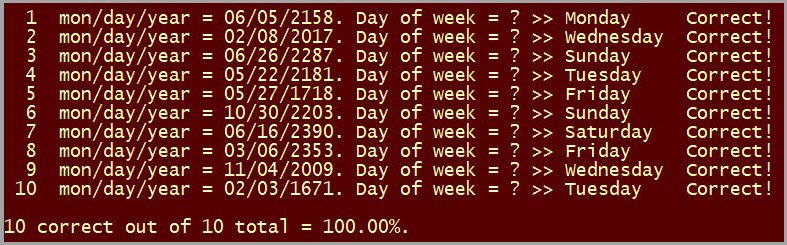
My first cut at computer-assisted practice was to
make an old-style text application that presented a set of pseudo-random dates in a
specified range of years, as illustrated above. The user typed in the
guessed (calculated) day name and the program scored it as correct or
not. Later I added timing to the original program.
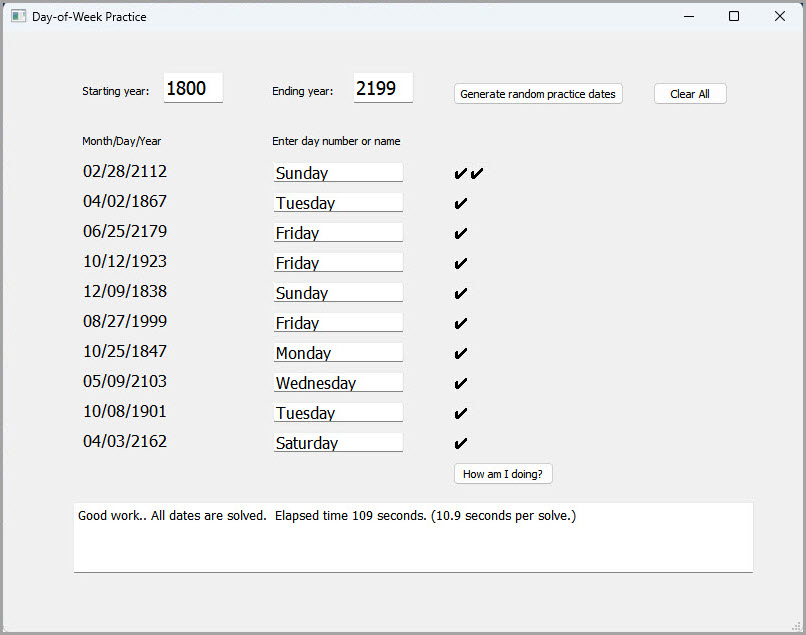
The second cut implemented the same concept as an MS
Windows GUI-style application, written
in Python. I called it the “Python Trainer,” and experimented with
having it estimate how hard the dates were. The form was created in Qt Designer.
—Prior to being reminded by the above screenshot, I had
forgotten that this version scored correct leap month answers
with a double checkmark!
These early practice programs almost
surely helped. However, they were unrealistic in a
significant way. With screen-presented challenge dates, it was not
necessary to remember the date to be solved, as the date was
continuously
viewable on the screen, and could be re-checked at any time. To succeed
in the parlor trick context, the solver must give full attention to the
challenge
date, and commit it securely to memory. It is an unpleasant feeling to
have completed the year calculation, and then to recall that the month
was either April or August.
Verbal training:
To have the computer program speak the date,
rather than display it, would not be particularly difficult. However,
could the whole performance cycle be emulated? That is, could the
program also ‘listen’ for
the day name and respond to a spoken ‘guess’ in the way it scores
written responses? I had not previously exercised computer speech
recognition and thought this problem might make an instructive exercise.
The next few paragraphs describe the Python
application that presents and scores computer-spoken dates, and the
human-spoken day-of-week replies.
Python is not my first programming language, or second, or third, ...
but accessory libraries are available for Python that support both
speech
synthesis and recognition. The application source code may be
examined or downloaded here.
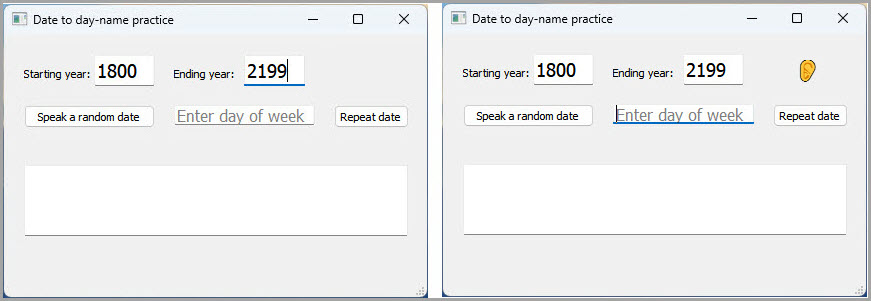
Two screen shots above show the program’s
start-up form (left), and how the form appears after ‘Speak a random
date’ has been clicked (right). The only difference is that an ‘ear’
emoji is present in the right form. The ‘ear’
emoji informs the user that the speech
recognition component is actively listening for a response.
The default microphone input device is expected. (I
use a Razer Seiren Mini USB
desk microphone.) When the application recognizes a day name, it
displays the name in the middle text box. Thus, the user can see what
the program thought it heard. Most of the time the speech recognizer
interprets the spoken day name correctly, but sometimes it displays
gibberish. A spoken day name is only scored correct or incorrect
if it matches an actual day name, Monday, Tuesday, etc.
(The application
does not score
gibberish.) If the
program hears gibberish, there are two options. One
is to click the ‘Repeat date’ button, which clears the previous
misinterpretation. The application then re-enunciates the test date.
The other option
is to clear the ‘day of week’ text box and type in the day name guess.
The speech recognition
component listens synchronously, not like a back and forth human
conversation. If the application doesn't respond to the spoken
voice within a second or two, repeating the day name guess during the
same listening segment often works. When an actual day name has been
‘heard’ the application’s spoken feedback is intentionally varied. Both
positive and negative responses are constructed from
random canned phrases, making its responses less repetitive.
Improving speed:
As a parlor trick, the calculation described in these paragraphs has
limited interest or
staying power. Indeed writing a computer program for training may be
more interesting than the trick itself.
Nevertheless, I will suggest a few techniques for enhancing trick
performance. Of course, speed is impressive. The faster
the answer is given, provided it is correct, the more impressive the
performance. Impression of speed can be enhanced in two ways: first,
by calculating the answer faster, and second, by seeming to calculate
the
answer faster.
The list of remembered doomsdays can be
easily extended. This happens more-or-less automatically with practice.
For example, both March and November doomsdays are the 7th
of the month in Conway’s list. Since the same day recurs at one-week
(7-day) intervals,
March 7, 14, 21, and 28 are all equivalent, and the same for November.
In ordinary years (non-leap years) this easily-remembered list applies
for
February as well.
October 10 is a doomsday, so Halloween (October 31
in the U.S.) is also the same day (10 + three 7’s).
July 11 is a doomsday, which means that American Independence Day July
4th (11 - 7) works, and is easily remembered by Americans. Similarly,
December 12 is a doomsday, which means that
Boxing Day in the UK and Canada (December 26) is a doomsday equivalent
date.

Another extension of memorized numbers that
tends to
happen automatically is to compile a list of “zero years” for the
recent past. These are years that calculate out to 0 (mod 7),
enabling the performer to skip the year part of the
calculation. Most human-presented challenge dates will tend to fall in
the recent past
(grandpa’s birthday or a friend’s
anniversary, and so forth). The box above lists zero years
between
1940 and the current year (2026). Next year (2027) will be another zero
year.
With care one can also ‘cheat’ for years that follow a remembered
zero year. For example if the next year after a zero year is not a leap year, e.g. 2005
or 2011, etc., then its calculated value will be ‘1’, and so forth.
It is advisable to keep in mind the day name
for the
current year’s doomsdays. For the year of this writing (2026) it is
Saturday. If someone were to ask me what day is Christmas this year, I
would immediately
know it is Friday, because Christmas is the day before Boxing Day,
which will fall on Saturday. The same computational shortcut works for
other holidays or special days, or any day, in the current year.
Now to enhancing the impression of speed ... The year
part of the day-name calculation is longer than the rest, and has to be
completed
first. In a situation where challenge dates are of a particular kind,
it may be possible to obtain the year part of the puzzle first, for
example, by asking, “In
what year was grandpa born?” If this trick succeeds, compute the year
part and file it away.
Then when month/day is presented, it will be possible to
answer in half the time or less.
Concluding thoughts:
Python’s speech recognition library (import speech_recognition)
works, but barely, or not in a truly satisfactory way. It
consumes the process while listening. I don’t
think it can be interrupted usefully. However, my experience is
limited. A more skilled programmer may be able to use the library in a
fluid conversational way. I would very much like to know how to do
this, if it is possible.
Notes:
Betsy Ross flag image from https://commons.wikimedia.org/wiki/File:Betsy-Ross-Flag.jpg
(public domain)
Project descriptions are intended for entertainment only.
The author makes no claim as to the accuracy or completeness of the
information presented. In no event will the author be liable for any
damages, lost effort, inability to carry out a similar project, or to
reproduce a claimed result, or anything else relating to a decision to
use the information on this page.